


TripIt: Travel Planner
4.714.59K Reviews
App Specs
- Version
- 15.7.0
- Updated On
- License
- Free
- Downloads
- 5,000,000+
- Developer
- TripIt, Inc.
- Categories
- Travel & Local
- Platform
- Android, iOS
Screenshots



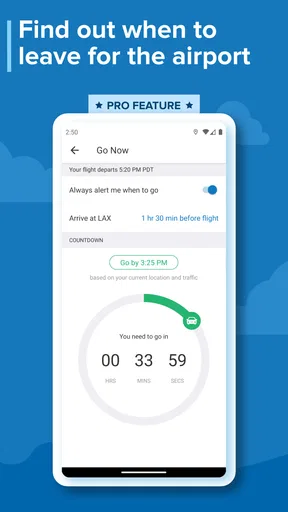
 Analysis by AppCompare
When I travel, the most useful thing an app can do is stop me from treating my inbox as an itinerary. TripIt: Travel Planner is built around that simple idea: gather travel confirmations in one organized place so I can check the shape of a trip without searching through separate messages. It is a travel-planning app from TripIt, Inc., and its focus is practical rather than flashy. I find it most valuable when a journey has several moving parts and I need one clear place to review them.
The benefit of one itinerary
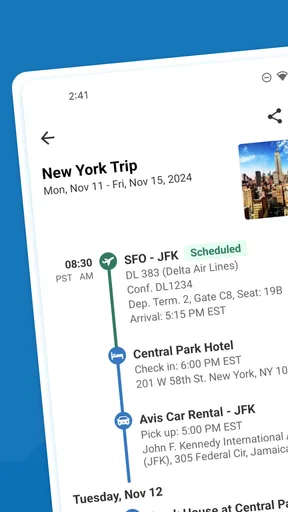
The central capability is the master itinerary. Instead of switching between flight, hotel, and car-rental confirmations, I can use a single trip view to keep those plans together. That matters most when I am tired, in transit, or trying to answer a quick question such as where I am staying after landing. The app is free to use, has an average rating of 4.7 from around 93,000 ratings, and has been installed over 5 million times. Those figures suggest that its straightforward organizing job meets a familiar need, though popularity alone cannot tell you whether its workflow suits the way you travel.
TripIt is aimed at travelers who already receive booking confirmations by email and want less manual sorting. Its basic approach is to forward confirmation messages to a designated address; the app then organizes the plans in one place. That is a useful distinction from a notes app, where I would have to copy details myself, or a calendar, where each booking may become a separate entry without the same trip-centered overview. The convenience depends on having confirmations that the service can turn into itinerary items, so I would still keep an eye on unusual bookings or changes that arrive outside the normal email flow.
Getting Started with TripIt
The first thing you’ll notice when you download TripIt is how easy it is to get started. You just forward your travel confirmation emails to a designated email address, and voilà, your itinerary is magically organized in one place. It’s like having a personal assistant that never sleeps!
Setting up is a breeze, and the app’s interface is intuitive. You won't be lost clicking around trying to find your way. Everything is right where you’d expect it to be. Honestly, the app almost feels like it reads your mind.
Making email forwarding work for you
The forwarding workflow is the part I would build into my routine before a busy trip. When a confirmation arrives, forwarding it while the details are fresh helps keep the itinerary current, rather than leaving a pile of messages to process the night before departure. I would also check the resulting trip after forwarding, especially if a message combines several services or includes a change notice. A single organized view is only useful if the important details have made it into that view correctly.
For a realistic example, imagine leaving home early, taking a flight, picking up a rental car, and checking into a hotel later that day. Instead of reopening several confirmation emails at each handoff, I can consult the trip plan for the next piece of the journey. If a colleague or family member needs to know where I am staying, the sharing option can make the plan easier to pass along than forwarding a chain of unrelated messages. I would still verify time-sensitive details with the airline or provider when a disruption occurs; an itinerary is a convenient reference, not a reason to ignore the source of a booking.
Worth Reading Before You Choose

EA SPORTS FC Mobile 26 Is a Bigger Football Game, but It Takes Time

Flipboard Shows What News Apps Must Do Beyond the Feed

Switching to Android Auto Means Rethinking Your Driving Routine

Google Calendar Makes a Crowded Week Easier to Manage

Ludo King Makes the Most of the Minutes Between Plans

Baby Panda World Brings Quick Play to Modern Phones, but Its Game Library Feels Busy
Features That Make Travel a Breeze
Let's dive into some of the features that really stood out to me. First off, TripIt provides a master itinerary. This means all your travel plans—flights, hotel bookings, car rentals—are in one place. You can easily access your plans even when you’re offline, which is a lifesaver when you’re jet-setting around the world.
Another fantastic feature is the real-time flight alerts. The app will notify you about any gate changes, delays, or cancellations before the airlines even get to you. It’s like having a crystal ball for any potential travel hiccups.
For those of you who are a bit more organized, the calendar sync feature is a gem. It integrates smoothly with your Google Calendar or Outlook, making sure you never miss a beat. Plus, the sharing function means you can keep your friends and family updated on your travel plans, just in case they want to live vicariously through your adventures!
How I would use the extra coordination tools
Calendar syncing is most helpful when I want travel blocks to sit beside work meetings and personal commitments, rather than relying on a separate trip screen to remember that I will be away. Sharing is useful for coordination too: someone meeting me at the airport can see the broad plan without needing every confirmation forwarded individually. I would be selective about what I share, though. A complete itinerary can contain more travel detail than a person needs, so I would send it only to people who genuinely need it.
Offline access is another practical advantage, particularly when I am moving between terminals or somewhere with unreliable service. I would open the itinerary before setting off and make sure the details I expect to need are available, rather than waiting until I have no connection to discover that I should have checked. That small habit makes a digital organizer more dependable in real travel conditions.
Where it sits beside other travel tools
Compared with keeping every confirmation in email, TripIt gives me a trip-focused view and reduces the searching involved in finding the next booking. Compared with entering everything into a calendar, it is better suited to grouping several reservations into one journey, while a calendar remains stronger for seeing travel alongside the rest of my schedule. A notes document can be more flexible for restaurant ideas, packing reminders, or a highly customized day-by-day plan, but it requires more upkeep. I would use TripIt for the reservation backbone and a notes app for loose ideas, rather than expecting one tool to do both jobs equally well.
That distinction also helps answer whether it can replace an airline app. I would not treat it as a substitute for the airline’s own channel when I need to manage a booking or confirm the latest operational instruction. TripIt is useful as an overview across a trip; the carrier remains the place I would check for flight-specific actions. Keeping both roles clear avoids expecting an organizer to resolve every travel problem.
Why I’m Hooked on TripIt
Let me tell you, after using TripIt for a few trips, I’m completely hooked. The level of stress reduction this app provides is worth its weight in gold. No more flipping through endless emails or fumbling with paper printouts—everything is neatly organized in the palm of your hand.
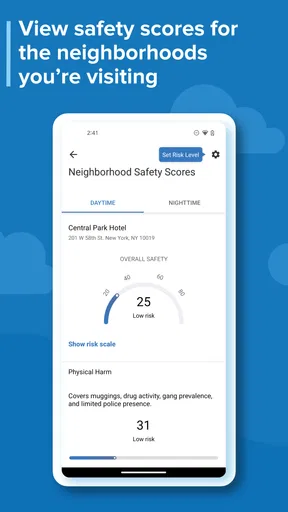
One feature I didn’t know I needed until I used it is the Neighborhood Safety Scores. When you're in a new city, it's comforting to get a quick safety overview of different areas. This is particularly handy for solo travelers or anyone venturing into unfamiliar territories.
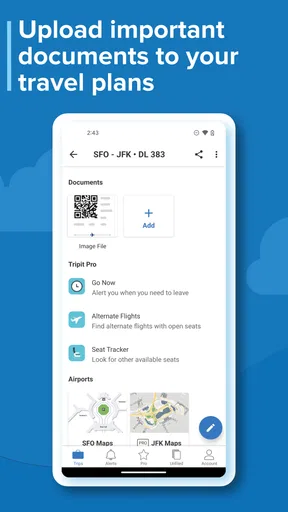
Additionally, if you decide to upgrade to TripIt Pro, there are even more goodies in store. You get additional features like refund notifications, alternate flight suggestions, and even point tracking for frequent travelers. It's like the app levels up with you as you become a more seasoned traveler.
What to consider before relying on it
The main trade-off is that an organized itinerary does not automatically remove every bit of travel admin. Forwarding confirmations is convenient, but it still asks me to make that small effort and check that the right information appears. If I book through several channels, receive a change by text, or make an arrangement verbally, I should not assume it will appear without adding or checking it. Travelers who prefer to plan every hour manually may find a spreadsheet or notes app gives them more control over custom details.
There is also a difference between the free app and the optional paid tier. The free version is a sensible starting point if my priority is collecting plans; Pro may be more appealing if refund notifications, alternate flight suggestions, and point tracking would earn their keep in my routine. In-app purchases are listed at $48.99 per item, so I would compare the value of those extras with how often I travel before paying. Someone taking one simple trip may not need the added tools, while a frequent traveler who actively uses them could judge the choice differently.
Who gets the most from it
I would recommend TripIt most readily to people who take multi-stop trips, travel for work, or coordinate bookings with someone else. It is especially handy when several confirmation emails need to become one practical reference. Occasional travelers can benefit too, particularly if they dislike digging through their inbox on departure day, but someone with only one straightforward reservation may find their email or calendar is already enough.
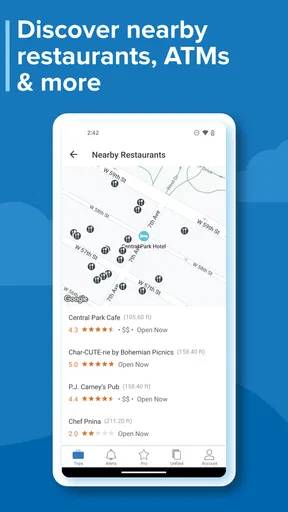
I would skip it if I want a full itinerary-building workspace for attractions, restaurants, maps, and every personal note, or if I strongly prefer entering and arranging every detail by hand. The app’s strength is bringing travel plans together, not replacing every planning tool or the official provider apps. It is available free, rated for Everyone, and its current version is 15.2.0; it requires Android 10 or later. Those details make it accessible to many travelers, while the optional purchases are worth considering only if the extra functions match a real need.
Final Thoughts
In a nutshell, TripIt: Travel Planner has transformed the way I travel. It’s made my trips less about juggling logistics and more about enjoying the journey. Whether you're a frequent flyer or an occasional traveler, this app is a must-have in your travel toolkit.
So, if you’re ready to take the chaos out of your travel plans and bring in some much-needed simplicity and organization, give TripIt a whirl. Trust me, once you try it, you won’t know how you ever traveled without it!
Pros
- Intuitive interface for easy navigation.
- Seamless itinerary syncing with email.
- Real-time flight alerts and updates.
- Comprehensive trip organization tools.
- Integrates well with calendar apps.
Cons
- Premium features require a subscription.
- Limited offline functionality.
- May drain battery with constant updates.
- Occasional syncing delays.
- Interface can be cluttered with ads.
FAQs for TripIt: Travel Planner
What is TripIt: Travel Planner and how does it work?
TripIt: Travel Planner is a comprehensive travel organization app that consolidates all your travel plans into a single itinerary. By forwarding confirmation emails to TripIt, the app automatically creates a detailed schedule that includes flights, hotel bookings, car rentals, and more. Users can access their itinerary anytime, even offline.
Is TripIt: Travel Planner free to use, or are there premium features?
TripIt offers a free version with basic features such as itinerary creation and email import. For additional benefits like real-time flight alerts, seat tracking, and reward program tracking, users can upgrade to TripIt Pro. The Pro version requires a subscription fee and offers enhanced travel management tools.
Can TripIt: Travel Planner be used offline?
Yes, TripIt allows users to access their travel itineraries offline. Once your travel details are imported, the app stores them on your device. This feature is particularly useful when traveling abroad without internet access or when you need to quickly reference your itinerary on the go.
How secure is my personal information with TripIt: Travel Planner?
TripIt prioritizes user privacy and security. The app uses encryption to protect your personal data, ensuring that sensitive information is safe during transfer and storage. Users can also control who has access to their itineraries, adding an extra layer of security and peace of mind.
Does TripIt integrate with other apps and services?
TripIt integrates seamlessly with a variety of apps and services, including Google Calendar, Apple Calendar, and Microsoft Outlook. It also works with travel services like Uber, Lyft, and Airbnb. These integrations help streamline the travel planning process, making it easier to manage and organize your trips.


